
You do not need an account to browse housing listings. The site helps you find possible options; the provider confirms availability, costs, requirements, and application steps.
Start your search
- Choose Find Housing in the main navigation. Select a housing category or choose Browse All Properties.
- On Housing Listings, choose a Category, enter a city, property name, or keyword in Search, and choose a Sort order. Select Search to apply these choices.
- The default sort is Recommended. Choose Newest for recent listings, or another available option such as Rent: Low to High or Available Soon.
- Select a listing card or View Details to open its description and photographs. Close the detail view to return to the results. Use the page controls if results span more than one page.
Use More filters
Choose More filters, then open a group. The current groups are:
- Screening & Flexibility: options include Housing Voucher Accepted, No application fee, case-by-case screening, and Flexible proof of income.
- Amenities & Included: options include Wheelchair accessible, laundry, furnishings, and listed utilities.
- Lease Terms: Short-term lease available, Month-to-month, or Waitlist available.
- Pets: choose Any, Pet Friendly, or No Pets.
- School District: choose Any or one of the listed districts.
Choose only the filters you need and select Show results. Results must match all selected filters, so adding choices can reduce the list. For example, choose Housing Voucher Accepted and then Show results to find listings carrying that tag.
View the current More filters panel
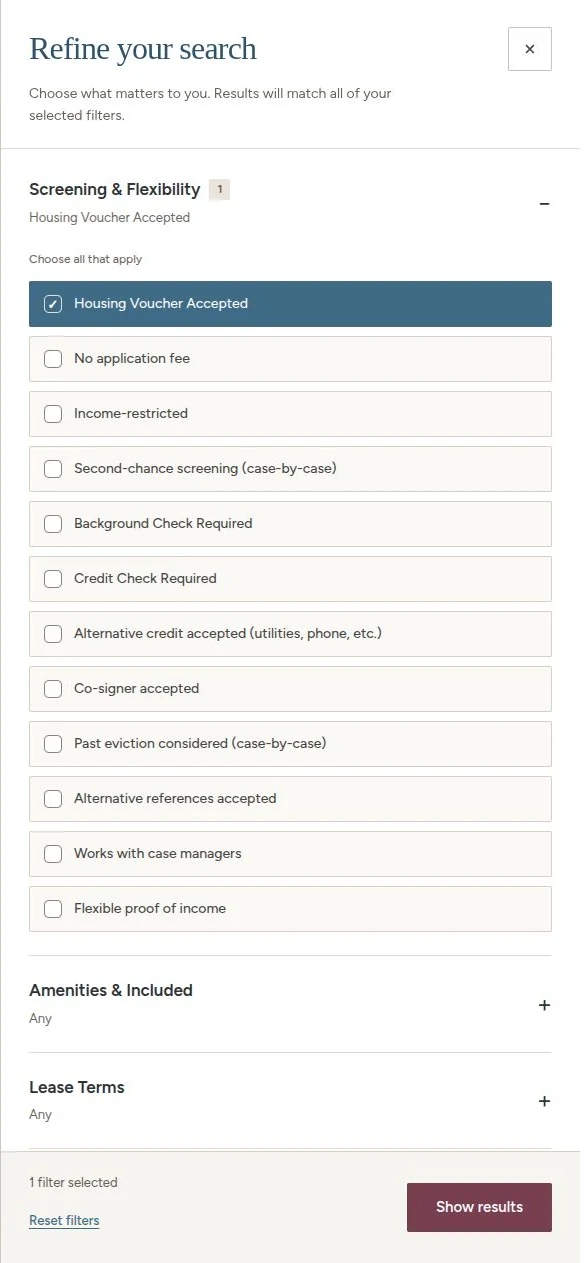
If there are too few results, remove a filter under Your filters. Clear all returns to the unfiltered listings page. Within the panel, Reset filters clears the additional filter choices; choose Show results to apply that reset.
Read the details and contact the provider
Check the location, supplied rent and deposit, available date, features, description, and contact or application instructions. Not every listing has every field completed. A missing tag or value means you should ask, rather than assume.
Use the contact method in the listing. Useful questions include whether the opportunity is still available, the total move-in cost, application requirements, and any voucher, pet, or accessibility needs relevant to you. Confirm what utilities and other costs are included.
Waitlist available does not mean an opening is ready now. Featured is a display label, not a guarantee of availability or suitability. Confirm the listing's current terms directly with the provider.
Get help with the next step
For practical guidance, visit Resources. To find local organizations and public contact details, visit Partners. Verify a provider and its application instructions before sending money or personal documents.
Reviewed October 29, 2026. Screen labels and available tools may vary with your access.