
A portal account is for participating partners. You do not need an account to browse housing, resources, or the public partner directory.
Request access
- Open Partner Sign In, then choose Request Account. You can also open the account request form directly.
- Under Account Information, enter and confirm your email address. Create and confirm a password of at least eight characters. Use an email address you check regularly.
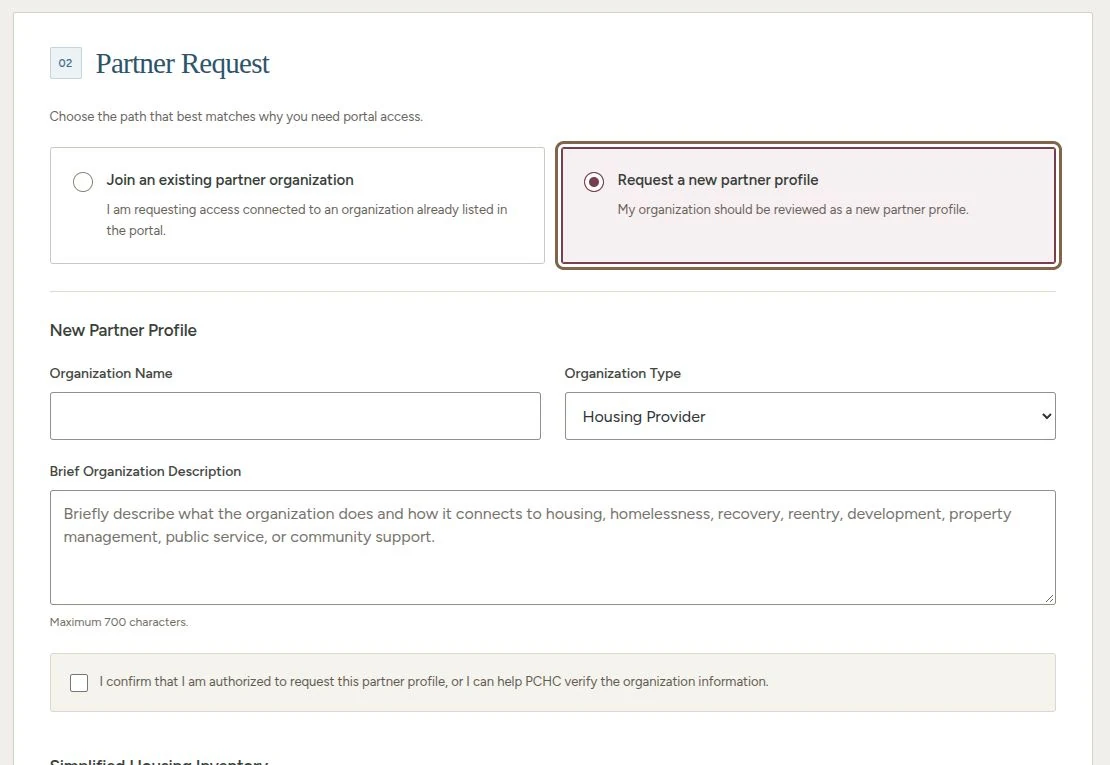
- Under Partner Request, choose the appropriate path below.
Join an existing partner organization
Select Join an existing partner organization and choose your organization from the list. This requests a connection; it does not automatically add you to the organization. Avoid requesting a duplicate profile.
Request a new partner profile
Select Request a new partner profile. Enter the organization name, choose its type, and add a brief description. Confirm that you are authorized to request the profile or can help PCHC verify the information.
For Housing Provider requests, complete Simplified Housing Inventory. Report standard units by bedroom size and special-purpose counts using the displayed units, such as beds or capacity. Average rents are optional. These counts are staged for review and are not published unless the account and partner profile are approved.
View the current partner request choices
Complete the request
Enter Your Role / Title with Organization, add an Optional Note to PCHC if helpful, review the information, and choose Submit Account Request. Follow the confirmation shown. Requests are reviewed before activation; submitting a request does not grant immediate access.
After approval
Sign in and open Organizations in the partner workspace. Select the correct organization if a switcher is available. Sections depend on your access and organization type:
- Profile holds descriptions, logo, and contact details. When ready for public display, select Show in public Partner Directory and choose Save Profile.
- Inventory, for housing providers, records total housing capacity. Use Save Inventory for updates or Confirm No Changes to confirm unchanged figures.
- Listings holds advertised housing opportunities. Choose New Listing to begin.
- Members concerns people connected to the organization. Editing permissions depend on your access.
If your account is approved but the expected organization or tools are missing, contact PCHC at info@pchousingcoalition.org. Do not create a second account or duplicate organization to work around missing access.
Next: Creating a Housing Listing.
Reviewed October 29, 2026. Screen labels and available tools may vary with your access.